AI Video Production
How to Build an AI Video Workflow for Modern Brands
Published on

By Nadeem Ahmad | Creative Director & Producer
Most discussions around generative AI in commercial video fall into two extreme camps. On one side are creators who believe typing text prompts into a browser will magically replace production crews overnight. On the other are traditional production houses that dismiss generative media entirely as unpredictable slop.
Both perspectives miss the operational reality.
If you rely on raw text prompts alone, you end up with chaotic motion, morphing limbs, and plastic skin textures. However, if you treat generative models like another specialised camera package or post-production department, the economics and velocity of commercial filmmaking change completely.
Over the last few years, I have built workflows for agencies and brands. My biggest takeaway is simple: do not get emotionally caught up in the hype. Be realistic. Automate the boring, repetitive tasks that drain hours from your day, but never hand over creative taste, pacing, or physical blocking to an algorithm.
Here is the exact setup and workflow I use to produce real work without losing creative control.
1. Where It Actually Started: The Frustration Behind the Motion Setup
When I was making Martian Boy, I was financing the project out of my own pocket. I did not have the kind of budget you need to rent massive studio spaces, hire full stunt teams, or build custom practical sets.
At the time, Google Veo was my main option. Anyone trying to direct a narrative series with Google Flow knows how frustrating it gets. Beyond 10-second clips, continuity completely falls apart.
The biggest headache was hitting aggressive guardrails and duplicate-generation blocks, especially in India. Standard story beats got shut down instantly. When I tried generating a robot with an Iron Man aesthetic, the system blocked it. When my character was supposed to get arrested near a police car, it refused to generate and threw policy errors. In a scripted series, action scenes are mandatory, and fighting automated filters burns whole days.
That forced me to find a workaround: stop relying on text prompts.
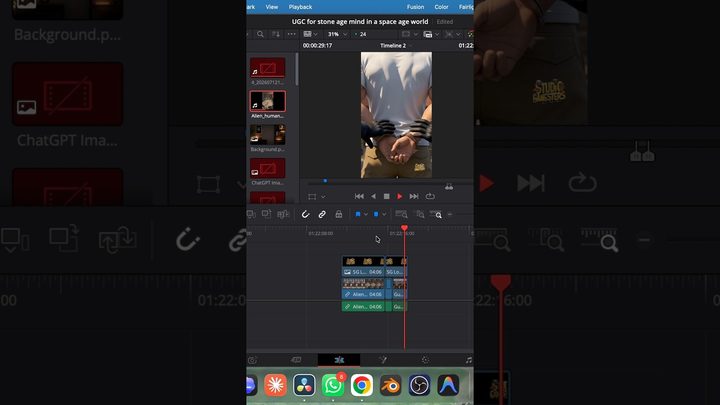
I set up a green screen in my room, performed the physical blocking on camera myself, and fed the real footage directly into the motion engine as a reference guide. Using physical plates bypassed the prompt filters and forced the model to follow real human movement.
"Even this setup will fail sometimes. When a model refuses to cooperate or keeps fighting your plates, do not waste hours arguing with it, just switch to a different model and move on"
2. Choosing : Three Ways to Build Your Infrastructure
If you are setting up a pipeline for your own studio or a client, your hardware choice will make or break your day-to-day work. There are three real paths you can take:
┌────────────────────────────────────────────────────────────────────────┐
│ OPTION 1: LOCAL DEDICATED HARDWARE (HIGH CAPEX, ZERO TOKEN FEES)       │
├────────────────────────────────────────────────────────────────────────┤
│ • NVIDIA RTX Spark: ~$4,999 - $5,500 (approx. ₹4.1 - 4.5 Lakh)         │
│ • NVIDIA DGX Spark: ~$4,699 - $6,950 (approx. ₹3.9 - 5.8 Lakh)         │
│ • Heavy Studio Tier: ~$50,000 - $95,000+ (approx. ₹40 - 80 Lakh+)      │
│ → Best for: Complete data privacy & heavy daily offline rendering.    │
└────────────────────────────────────────────────────────────────────────┘

┌────────────────────────────────────────────────────────────────────────┐
│ OPTION 2: UNIFIED API ROUTING (FLEXIBLE & SCALABLE)                    │
├────────────────────────────────────────────────────────────────────────┤
│ • Starting Test Budget: Low as $100 in credits (₹8,000 - ₹8,500)       │
│ • Pay-as-you-go: OpenRouter, Claude 5.5 Opus, Astra, GPT-4o            │
│ • Developer Tooling: Claude Code CLI integration                       │
│ → Best for: Multi-model flexibility without locking into hardware.     │
└────────────────────────────────────────────────────────────────────────┘

┌────────────────────────────────────────────────────────────────────────┐
│ OPTION 3: SAAS MULTI-TOOL SUBSCRIPTIONS (HIGH RECURRING OPEX)          │
├────────────────────────────────────────────────────────────────────────┤
│ • Chat & Scripting: $20 - $30/seat/month (ChatGPT Plus, Claude Team)   │
│ • Video & Motion: $30 - $95/month (Kling, Runway, Higgsfield)          │
│ • 3D & Audio: $20 - $50/month (Meshy, ElevenLabs)                      │
│ → Best for: Fast testing; high recurring cost and scattered files.     │
└────────────────────────────────────────────────────────────────────────┘
Option 1: Local Hardware (Heavy Upfront Cost, Zero Token Fees)
-
The Setup: You buy your own silicon upfront. Depending on your team size, you are looking at:
- NVIDIA RTX Spark Workstations: Arm-based portable desktops running Windows 11 on Arm with up to 128 GB memory, sitting around $4,999 to $5,500 (roughly ₹4.1 to ₹4.5 Lakh). Good for individual creator workstations.
- NVIDIA DGX Spark Units: Dedicated 140W Linux mini-desktops running the GB10 Grace Blackwell chip with 128 GB unified memory, priced between $4,699 and $6,950 depending on tier and supply (roughly ₹3.9 to ₹5.8 Lakh).
- Enterprise DGX Stations: High-end multi-GPU racks and towers starting around $50,000 and climbing past $95,000 (₹40 Lakh to ₹80 Lakh+), built for studios fine-tuning proprietary models across dozens of seats.
On these systems, you pull code straight from GitHub and hugging face run open-weight models like LTX-Video 2.5, Stable Diffusion, or any local LLMs.
-
The Good: Once the machines are in the room, you are not paying per generation. You do not worry about cloud server queues, API downtime, or client NDA leaks.
-
The Catch: You need someone on the team who genuinely understands systems engineering. You will deal with out-of-memory crashes, CUDA driver updates that break pipelines, context window limits, and GPU thermal throttling. When something breaks on set, you have to fix it yourself.
Option 2: Unified API Routing
- The Setup: Instead of spending on hardware right away, you build a clean routing layer using APIs (like OpenRouter or direct developer endpoints) and connect them through CLI developer tools like Claude Code. This lets your team call multiple models through a single technical interface.
- The Costs: You can start with as little as $100 (around ₹8,000 to ₹8,500) in credits to test your flow. Pay-as-you-go pricing keeps token costs sensible:
- Claude 5.5 Opus: ~$15.00 per million input tokens, ~$75.00 per million output tokens.
- Astra: ~$5.00 per million input tokens, ~$15.00 per million output tokens.
- Claude Code: You can connect Claude Code straight from your terminal to write scripts, search internal repositories, and link your media folders without having to buy bloated enterprise software.
- The Good: Zero hardware lock-in. When a new model drops next Tuesday, you just update a single line in your script instead of buying new graphics cards.
- The Catch: You are paying per token. If your editors run endless unchecked generations, your bill can climb quickly without solid monitoring.
Option 3: Stacking Web Subscriptions (The SaaS Route)
- The Setup: Buying individual monthly seats across 5 or 6 web platforms:
- Chat and scripting: $20 a month for ChatGPT Plus, or around ₹2,000 to ₹2,500 ($20 to $25 per user) for Claude Team.
- Video generation: $30 to $60 a month for Midjourney, plus $30 to $95+ a month for Luma, Runway, or specialized motion tools like Higgsfield.
- 3D and voice: Another $20 to $50 a month for platforms like ElevenLabs or Meshy.
- The Good: Anyone on your team can log in and start using it in two minutes.
- The Catch: It turns into an expensive, messy headache very fast. Billing is scattered, files end up trapped in separate cloud downloads, and your team wastes half their afternoon downloading an MP4 from one website just to re-upload it to another.
Production Note for Traditional Studios: If you are a traditional production company trying to transition, train your existing editors and animators on the API route or targeted seats first. Let them get comfortable with how models respond to prompts. Once client projects bring in steady cash flow, you can look at buying dedicated DGX Spark or RTX hardware.
3. Match the Model to the Task: Stop Wasting Compute
One common trap I see teams fall into is using the most massive, expensive model for simple jobs. Just like you would not use a sledgehammer to hang a small picture frame, you do not need a massive reasoning model to brainstorm rough ideas:
- Fast Scripting & Beat Outlines: Use fast, lightweight models like Claude 4.6 Sonnet or medium-tier models. They give you snappy responses with zero lag while you bounce scene ideas around.
- Dense World-Building & Continuity: Save heavy reasoning models strictly for untangling complex story contradictions, checking technical specs, or writing detailed production briefs.
- Visual Synthesis & Video: Bring in GPT Image, Midjourney, Luma, or Runway only after your script and scene beats are locked. Generating video before you have a script is just burning money for fun.
4. Fixing the Daily Search Headache: Local RAG (Retrieval-Augmented Generation)
Here is a problem every creative agency knows all too well: an editor needs a background plate or 3D element used three weeks ago. Because nobody named the file properly, they spend an hour clicking through folders labeled final_v2_edit_FINAL.mov.
We fix this by setting up local semantic search:
- Instead of relying on manual file names, the local repository indexes visual assets based on semantic embeddings.
- An editor simply types what they are looking for into a search bar: "car driving through neon rain at night" or "wide shot of warehouse roof at dusk."
- The system reads the visual content and pulls up the exact clip or 3D asset in seconds.
It is a simple change, but it saves hours of pure frustration across an active team.
5. The Camera Matters: Why We Use the Sony FX3
You cannot get a cinematic look purely out of software. Real film has optical depth, lens character, and genuine sensor behavior.
My main camera for all our hybrid work is the Sony FX3.
The FX3 carries a full-frame sensor built on the same architecture Sony uses in cinema cameras for major Hollywood films (they even used it for specialized shots in Spider-Man). It handles dynamic range and skin tones properly right out of the gate.
The Live Motion Formula
Instead of begging a text prompt to render a complex movement:
- The Physical Take: An actor performs the movement against a clean green screen. The FX3 captures the head angle, posture, and pacing.
- Clean Extraction: We use modern neural keying tools (like Corridor Keyer or local depth mattes) to pull the actor cleanly. Running this locally keeps the fine edges and hair details intact without weird artifacts.
- Motion Guidance: We pass that keyed plate into our generative pipeline. The AI handles the environment, clothing textures, or world styling, but the physical human motion remains rock solid because it came from real footage.
6. Pre-Visualization: 3D Animation Meets AI Generation
For complex visual effects or world-building, jumping straight into video generation burns your budget and yields random results.
Instead, we link rough 3D passes directly into the generative layer:
- Rough 3D Blocking: A 3D artist builds a quick, low-poly layout in Blender. This locks in your exact camera path, lens focal length, and spatial dimensions.
- Low-Resolution Draft Passes: We run the rough viewport render through generation tools at low draft resolution (720p) to test lighting, mood, and material surfaces.
- Final Polish: Once the camera motion and look are locked, we upscale the final plates to clean 1080p or 4K.
Separating spatial geometry from surface rendering gives you complete control over your camera while cutting iteration costs dramatically.
7. The 3-Generation Rule
AI generation is unpredictable. You will almost never get the exact shot you want on the first try.
My studio works by a strict 3-Generation Rule:
- Take 1 (The Stable Base): Low motion intensity, strict frame adherence. This locks in character stability.
- Take 2 (Camera Drift): Slightly higher motion to introduce realistic handheld camera movement and parallax.
- Take 3 (Atmospheric Texture): Targeted render focusing on background elements like haze, dust, or lens flares.
If a shot does not look right, do not keep rewriting the prompt. Figure out which specific variable failed: adjust your framing, refine your matte, or tweak your seed number. Treat it like adjusting lights or lenses on a real set.
8. Post-Production: Finishing in the Editor
AI tools give you raw visual plates; they do not give you a finished film. The real magic happens inside your editing timeline (DaVinci Resolve or Premiere Pro):
- Cut the Glitchy Edges: Generative clips almost always stutter for the first 0.5 seconds or drift at the end. Trim those frames off immediately and keep only the rock-solid middle.
- Kill the Plastic Look: Raw AI footage has an overly smooth, artificial sheen. Grade the footage with real film emulation LUTs, balance the colors, and overlay subtle 35mm grain to match real lenses.
- Sound Design (The Missing Half): AI video comes out completely silent. A scene only feels real when you build a rich bed of sound underneath: footsteps, cloth rustle, room tone, and subtle foley. If the sound design is grounded in reality, the viewer's brain instantly accepts the visual as real.
The Bottom Line
At the end of the day, lasting creative work does not come from machine power. It comes from human taste, storytelling, and knowing how to steer the tools.
Automate the boring, mechanical tasks: asset sorting, rough animatics, and rotoscoping. But do not ever outsource your taste, your sense of pacing, or your creative perspective to software.
Look at your actual production needs realistically:
- Pick the infrastructure that fits your current budget rather than overspending on hardware.
- Start with a clean API setup to train your team.
- Anchor all complex motion with real cameras and physical human performance.
- Finish every piece of work with traditional post-production discipline.
Related Strategic Breakdowns & Workflows
To see how these principles connect with wider brand architecture, explore these deep dives:
- AI & Operational Leverage: The Real Shift Behind AI: Structural Compression — How AI restructures creative pipelines instead of just generating superficial media.
- Commercial Visual Value: The Visual Economy: Unlocking Untapped ROI for FinTech & Tech Brands — Measuring tangible brand equity and return on high-end visual systems.
- Creative Discipline: How Writing Rewires Your Brain: A Creative Professional’s Perspective — Why clear written thinking remains the foundation of every scalable production workflow.
Let's Build Your Pipeline
If your company or brand is looking to build custom AI video pipelines, set up hybrid production workflows, or produce high-end commercial campaigns, let’s connect:
- Portfolio & Workflows: ahmadnadeem.in
- Direct Inquiries: info.ahmadnadeem@gmail.com
- Explore Capabilities: Video Production Services & AI Workflows
- Production Architecture Case Study: 700 Holographic Employees Case Study
- Behind-The-Scenes & Industry Work: Connect on LinkedIn, check out tutorials on YouTube, and view film & series credits on IMDb.
Need similar results for your brand?
Explore service-specific pages for video production, creative strategy, event content, and OTT documentary workflows.
Enjoyed this analysis?
Get concise briefings on creative technology, filmmaking, and production developments.
Read Next

Comments
Leave a comment
No comments yet. Be the first to share your thoughts!